School Paper: Capturing the Innocence of Classroom Memories
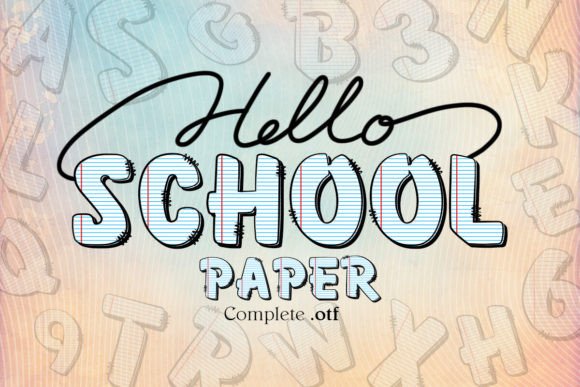
There is a distinct, sensory memory that lives in the minds of almost everyone who has ever sat at a wooden desk. It is the smell of fresh, white paper on the first day of school, a blank slate where everything seems possible. It is the sound of a pencil scratching against a page as an eager student scribbles down notes while a wise teacher shares knowledge. This feeling of charming innocence and the sincere homage to the traditions of learning are exactly what School Paper aims to capture. For anyone looking to infuse their projects with this specific nostalgic essence, School Paper Font serves as the perfect tool to evoke those beautiful days woven through the heart of our education journeys.
However, selecting a font that carries such emotional weight requires more than just downloading a file because it looks cute. Many creators, from small business owners to professional marketers, make the mistake of assuming all digital typefaces function identically across every platform. When dealing with specialized fonts like School Paper, overlooking technical compatibility can lead to wasted time, ruined materials, and a final product that falls short of your vision. Understanding the nuances between the black version and the color version of this font is critical before you commit to a design project.
The Hidden Complexity of Color Fonts
One of the most common misunderstandings among beginners and even experienced designers involves the difference between standard monochrome fonts and multi-color OpenType fonts. School Paper offers both a classic black version and a vibrant color version. The allure of the color version is undeniable; it brings the imagery of crayon scribbles or colored pencils to life instantly. Yet, many users attempt to load these color files into cutting machines without verifying compatibility, leading to immediate frustration.
The reality is that the color version of School Paper relies on advanced rendering features found in specific design programs like PhotoShop, Illustrator, Silhouette, and Inkscape. These applications understand how to interpret the OTF (OpenType) or TTF (TrueType) files that contain multiple color layers. If you try to force these files into software that does not support multi-color glyphs, the result is often garbled text, missing characters, or a complete failure to render the design. This isn't a flaw in the font itself, but rather a mismatch between the file format and the software's capabilities.
The impact of this oversight can be costly. Imagine spending hours designing a custom educational banner or a set of classroom decorations, only to discover upon printing or cutting that the colors have been stripped away or the text has become illegible. In a professional setting, this delays timelines and increases costs due to rework. For hobbyists, it can be a significant dampener on the creative momentum. To avoid this, always verify your software's compatibility list before purchasing or downloading the color variant. If you are unsure, consult resources like the Ultimate Font Guide provided by the creator, which details exactly which programs support these complex file types.
Navigating Cutting Machine Limitations
A specific area where confusion frequently arises is within the realm of vinyl crafting and die-cutting, particularly for users of Cricut Design Space. The black version of School Paper is fully compatible with Cricut Design Space and other cutting machines. This makes it an excellent choice for creating physical decals, t-shirts, and signage where a single color of vinyl or heat-transfer material is used. However, the color version presents a hard stop for these devices.
Many crafters assume that because a font works in one aspect of their workflow, it will work in another. They might see the beautiful color preview in their browser or design app and immediately attempt to send it to their Cricut machine for cutting. Unfortunately, the OTF and TTF files of the color version are not compatible with Cricut. The machine cannot process the multi-layered data required to cut different colors simultaneously or layer them correctly in the way the font intends. Attempting to do so usually results in error messages or a machine that simply refuses to recognize the file structure.
To navigate this effectively, adopt a strategic approach based on your output method. If your primary goal is to use a cutting machine like Cricut, Silhouette Cameo (for cutting only), or similar hardware, stick strictly to the black version of School Paper. You can still achieve a colorful look by using different colored vinyls manually, layering the text yourself, or applying the font to a substrate that allows for painting or coloring later. This workaround preserves the aesthetic charm while respecting the technical limitations of the hardware. By planning your workflow around the tool's constraints rather than forcing the tool to adapt to the file, you ensure a smoother, more successful project execution.
Evaluating Your Project Needs Before Downloading
Before you decide to integrate School Paper into your next venture, take a moment to evaluate the scope of your project. Are you creating a digital graphic for a blog post about education? A printed flyer for a tutoring center? Or perhaps a set of physical stickers for a teacher appreciation gift? Each of these scenarios dictates which version of the font you should choose.
- Digital-Only Projects: If you are working entirely within Adobe Creative Cloud or similar robust design suites, the color version offers a unique visual flair that can make your content stand out. It captures the "cute" and "charming" vibe perfectly for social media graphics or website headers.
- Physical Cutting Projects: For vinyl decals, iron-ons, and laser engraving where single-pass cutting is required, the black version is the superior choice. It ensures clean lines and reliable performance in Design Space.
- Hybrid Workflows: If you need both, consider purchasing both versions if available, or plan your design process to separate the digital rendering from the physical cutting phase.
Another often-overlooked detail is legibility. While School Paper is designed to mimic the handwriting of an eager student, there is a fine line between charming and unreadable. When scaling the font down for small labels or intricate details, the handwritten style can become difficult to decipher. Always test your design at the intended size before finalizing. If the text becomes too dense or the loops and curves merge together, you may need to adjust the tracking (letter spacing) or opt for a slightly larger point size to maintain clarity.
Maximizing the Emotional Impact
Beyond the technical specifications, the true value of School Paper lies in its ability to communicate emotion. It is an ode to the journey of learning. When used correctly, it transforms a simple message into a story. However, context matters. Using this font for a formal legal document or a high-stakes corporate presentation would likely undermine the message, as the playful nature of the typeface clashes with the seriousness of the content.
Instead, reserve School Paper for projects that benefit from warmth, nostalgia, and approachability. Think back-to-school campaigns, children's book covers, classroom decor, or personal scrapbooks. By aligning the font's inherent personality with the right subject matter, you enhance the viewer's connection to the content. The font acts as a bridge, connecting the audience to those universal memories of fresh notebooks and new beginnings.
Ultimately, avoiding mistakes with School Paper comes down to preparation and understanding the tools at your disposal. By distinguishing between the capabilities of your design software and your cutting machines, and by choosing the correct file version for your specific medium, you ensure that your project retains its quality and charm. Whether you are a beginner just starting to explore digital design or a seasoned professional refining your brand's voice, taking the time to respect these technical details will save you from unnecessary headaches and allow you to focus on what truly matters: capturing the magic of those school days.